QtRichToolTip#
A PyCharm-style rich tooltip that renders HTML content, displays images and animated GIFs, contains clickable hyperlinks, and supports action buttons in a footer bar.
Screenshot#
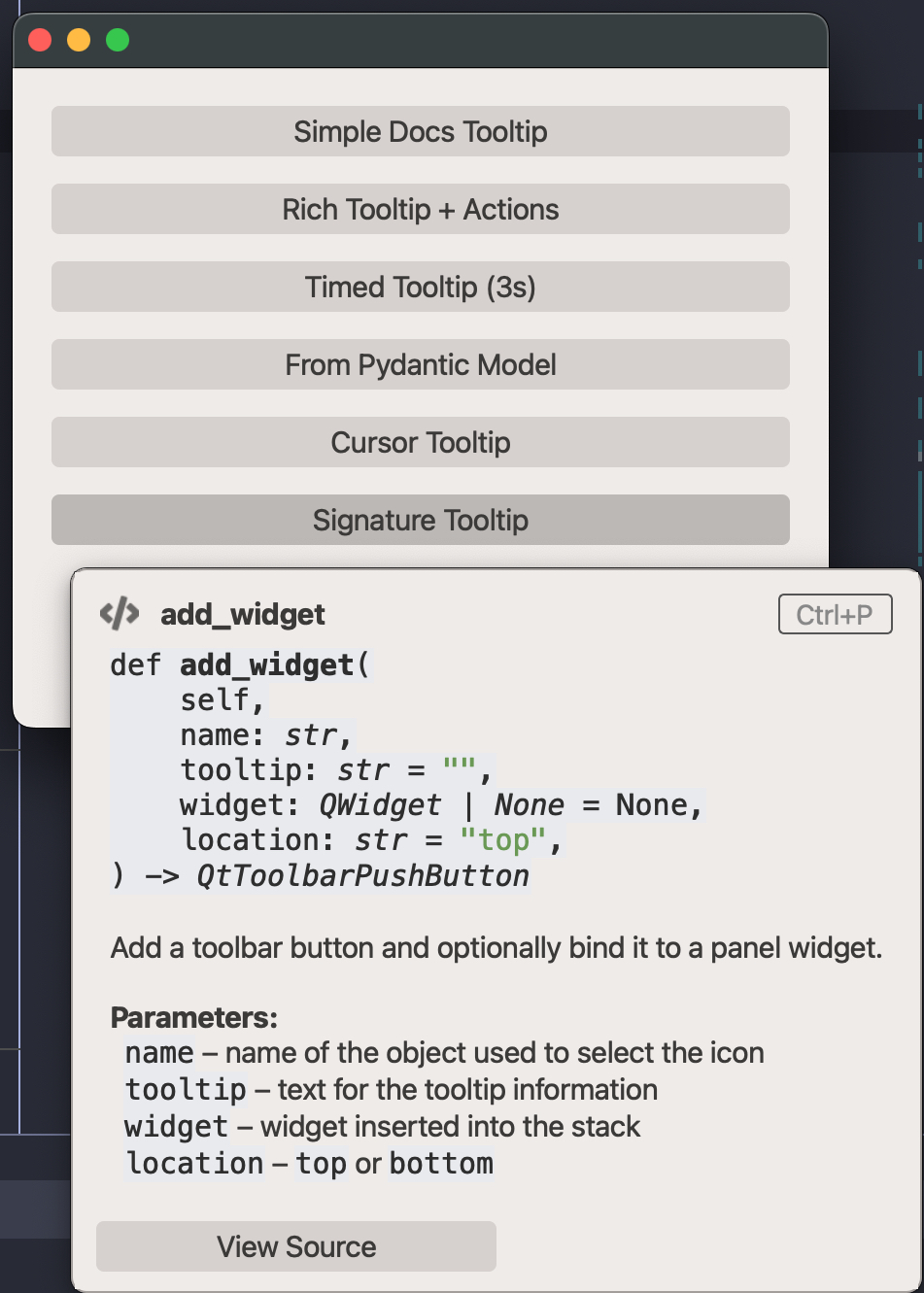
Example#
Source: examples/qt_tooltip_rich.py
"""QtRichToolTip example."""
from qtpy.QtWidgets import QApplication, QVBoxLayout, QWidget
import qtextra.helpers as hp
from qtextra.config import THEMES
from qtextra.widgets.qt_tooltip_rich import QtRichToolTip, RichToolTipAction, RichToolTipData
app = QApplication([])
widget = QWidget()
widget.setMinimumSize(420, 340)
THEMES.apply(widget)
layout = QVBoxLayout(widget)
def _show_simple() -> None:
QtRichToolTip.show_tooltip(
title="Quick Documentation",
content=(
"<b>dict.get</b>(key, default=None)<br><br>"
"Return the value for <i>key</i> if <i>key</i> is in the dictionary, "
"else <i>default</i>.<br><br>"
"<code>d = {'a': 1}; d.get('b', 42) # returns 42</code>"
),
icon="fa5s.book",
shortcut="Ctrl+Q",
target=btn_simple,
parent=widget,
)
btn_simple = hp.make_btn(widget, "Simple Docs Tooltip", func=_show_simple)
layout.addWidget(btn_simple)
def _show_rich() -> None:
QtRichToolTip.show_tooltip(
title="QtRichToolTip Widget",
content=(
"A <b>PyCharm-inspired</b> tooltip that supports:<br>"
"<ul>"
"<li>Rich <b>HTML</b> formatting</li>"
"<li>Images and animated GIFs</li>"
'<li>Clickable <a href="https://doc.qt.io">hyperlinks</a></li>'
"<li>Action buttons in a footer</li>"
"</ul>"
"Use it anywhere you need a polished documentation popup."
),
icon="fa5s.info-circle",
actions=[
RichToolTipAction(label="Learn More", callback=lambda: print("Learn more")),
RichToolTipAction(label="View Source", object_name="success_btn"),
],
target=btn_rich,
parent=widget,
)
btn_rich = hp.make_btn(widget, "Rich Tooltip + Actions", func=_show_rich)
layout.addWidget(btn_rich)
def _show_timed() -> None:
QtRichToolTip.show_tooltip(
title="Auto-dismiss",
content="This tooltip will disappear in <b>3 seconds</b>.",
icon="fa5s.clock",
duration=3000,
target=btn_timed,
parent=widget,
)
btn_timed = hp.make_btn(widget, "Timed Tooltip (3s)", func=_show_timed)
layout.addWidget(btn_timed)
def _show_from_model() -> None:
data = RichToolTipData(
title="From Model",
content="Created via <code>RichToolTipData</code> Pydantic model.",
icon="fa5s.database",
actions=[RichToolTipAction(label="OK")],
)
QtRichToolTip.show_from_data(data, target=btn_model, parent=widget)
btn_model = hp.make_btn(widget, "From Pydantic Model", func=_show_from_model)
layout.addWidget(btn_model)
def _show_cursor() -> None:
QtRichToolTip.show_tooltip(
title="Cursor Tooltip",
content="This tooltip appears at the <b>cursor position</b> rather than anchored to a widget.",
icon="fa5s.mouse-pointer",
duration=4000,
)
btn_cursor = hp.make_btn(widget, "Cursor Tooltip", func=_show_cursor)
layout.addWidget(btn_cursor)
def _show_signature() -> None:
QtRichToolTip.show_tooltip(
title="add_widget",
content=(
"<code>"
"def <b>add_widget</b>(<br>"
" self,<br>"
" name: <i>str</i>,<br>"
" tooltip: <i>str</i> = <span style='color:#6a9955;'>\"\"</span>,<br>"
" widget: <i>QWidget | None</i> = None,<br>"
" location: <i>str</i> = <span style='color:#6a9955;'>\"top\"</span>,<br>"
") -> <i>QtToolbarPushButton</i>"
"</code><br><br>"
"Add a toolbar button and optionally bind it to a panel widget.<br><br>"
"<b>Parameters:</b><br>"
" <code>name</code> \u2013 name of the object used to select the icon<br>"
" <code>tooltip</code> \u2013 text for the tooltip information<br>"
" <code>widget</code> \u2013 widget inserted into the stack<br>"
" <code>location</code> \u2013 <code>top</code> or <code>bottom</code>"
),
icon="fa5s.code",
shortcut="Ctrl+P",
actions=[
RichToolTipAction(label="View Source", callback=lambda: print("Navigate to source")),
],
target=btn_sig,
parent=widget,
)
btn_sig = hp.make_btn(widget, "Signature Tooltip", func=_show_signature)
layout.addWidget(btn_sig)
layout.addStretch()
widget.show()
app.exec_()
Notes#
- The tooltip appears below the target widget by default and flips upward when near the screen edge.
- When the mouse hovers over the tooltip, all dismiss timers are paused so the user can read content and click buttons.
- Only one tooltip is visible at a time (singleton pattern) — showing a new one dismisses the previous.
- Set
duration=-1for persistent tooltips that dismiss on mouse-leave, or pass a positive millisecond value for auto-dismiss. - The
<code>tags in HTML content are automatically styled with theme-aware colors (dark/light mode). - Use
RichToolTipDatato declaratively define tooltip content as a Pydantic model and pass it toshow_from_data.
API#
Qt Class#
Signals#
evt_closed#
Methods#
Floating, PyCharm-style rich tooltip.
Shows near a target widget or at the cursor position. Supports:
- Rich HTML content with clickable links
- Images and animated GIFs
- A title with an optional icon and keyboard-shortcut badge
- Action buttons in a footer bar
- Auto-dismiss after a timeout, or persistent until the mouse leaves
Parameters:
| Name | Type | Description | Default |
|---|---|---|---|
content_widget
|
_RichToolTipContent
|
Pre-built content frame. |
required |
target
|
QWidget | None
|
Widget to anchor the tooltip near. When None the tooltip appears at the current cursor position. |
None
|
duration
|
int
|
Auto-hide delay in milliseconds. Use |
-1
|
parent
|
QWidget | None
|
Parent widget (usually the application's top-level window). |
None
|
dismiss() -> None
classmethod
#
Dismiss the currently active tooltip, if any.
show_from_data(data: RichToolTipData, target: QWidget | None = None, parent: QWidget | None = None) -> QtRichToolTip
classmethod
#
Create and show a rich tooltip from a :class:RichToolTipData model.
Parameters:
| Name | Type | Description | Default |
|---|---|---|---|
data
|
RichToolTipData
|
Declarative tooltip specification. |
required |
target
|
QWidget | None
|
Anchor widget. |
None
|
parent
|
QWidget | None
|
Parent widget. |
None
|
Returns:
| Type | Description |
|---|---|
QtRichToolTip
|
The tooltip instance (already visible). |
show_tooltip(title: str = '', content: str = '', image: str | QPixmap | None = None, icon: str | None = None, actions: list[RichToolTipAction] | None = None, shortcut: str = '', target: QWidget | None = None, duration: int = -1, parent: QWidget | None = None) -> QtRichToolTip
classmethod
#
Create and show a rich tooltip in one call.
Parameters:
| Name | Type | Description | Default |
|---|---|---|---|
title
|
str
|
Bold header text. |
''
|
content
|
str
|
Rich HTML body. Supports |
''
|
image
|
str | QPixmap | None
|
Path to an image/GIF or a :class: |
None
|
icon
|
str | None
|
QtAwesome icon name shown next to the title. |
None
|
actions
|
list[RichToolTipAction] | None
|
Buttons rendered in a footer bar. |
None
|
shortcut
|
str
|
Keyboard shortcut badge (e.g. |
''
|
target
|
QWidget | None
|
Anchor widget. When None the tooltip appears at the cursor. |
None
|
duration
|
int
|
Auto-hide in ms. |
-1
|
parent
|
QWidget | None
|
Parent widget. |
None
|
Returns:
| Type | Description |
|---|---|
QtRichToolTip
|
The tooltip instance (already visible). |
Methods#
A clickable button rendered in the tooltip footer.
Parameters:
| Name | Type | Description | Default |
|---|---|---|---|
label
|
str
|
Button text. |
required |
callback
|
Callable | None
|
Function invoked when the button is clicked. |
required |
object_name
|
str
|
Qt object name applied to the button (for stylesheet targeting). |
required |
model_config = ConfigDict(arbitrary_types_allowed=True)
class-attribute
instance-attribute
#
Methods#
Declarative data model for a rich tooltip.
All visual properties of the tooltip can be specified via this model
and then passed to :meth:QtRichToolTip.show_tooltip or used to
construct a :class:_RichToolTipContent directly.
Parameters:
| Name | Type | Description | Default |
|---|---|---|---|
title
|
str
|
Bold header text. |
required |
content
|
str
|
Rich HTML body. Supports |
required |
image
|
str | None
|
Path to an image or animated GIF shown above the text body. |
required |
icon
|
str | None
|
QtAwesome icon name shown next to the title. |
required |
shortcut
|
str
|
Keyboard shortcut badge rendered to the right of the title. |
required |
actions
|
list[RichToolTipAction]
|
Buttons rendered in a footer bar below a separator. |
required |
duration
|
int
|
Auto-hide delay in ms. |
required |