WhatsNewDialog#
Multi-page release notes dialogs for onboarding users to new features.
Screenshot#
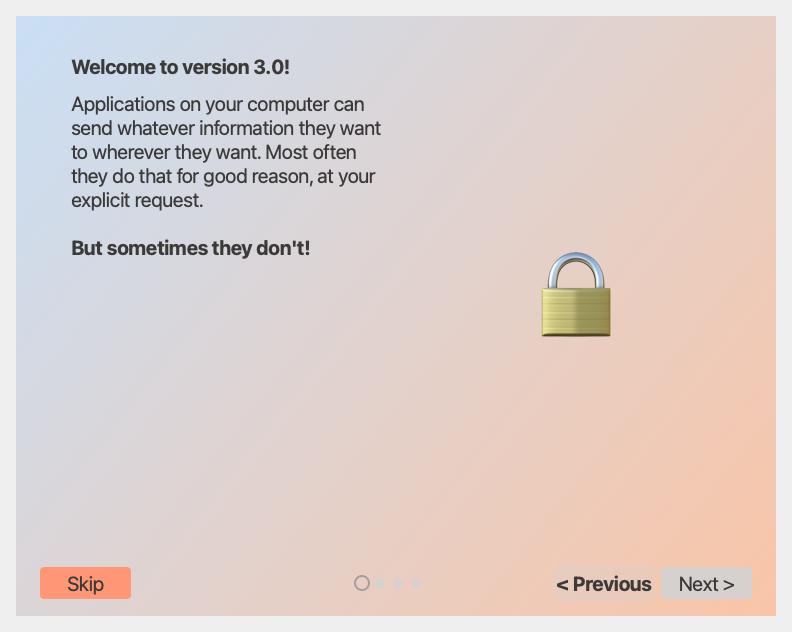
Example#
Source: examples/dialog_whats_new.py
from qtpy.QtWidgets import QApplication

from qtextra.config import THEMES
from qtextra.dialogs.qt_whats_new import QtWhatsNewDialog, WhatsNewPage

DEMO_PAGES = [
    WhatsNewPage(
        title="Welcome to version 3.0!",
        html=(
            "Applications on your computer can send whatever information they "
            "want to wherever they want. Most often they do that for good reason, "
            "at your explicit request.<br><br>"
            "<b>But sometimes they don't!</b>"
        ),
        icon_char="🔒",
        gradient_start="#C9DFF5",
        gradient_end="#F9C5A7",
    ),
    WhatsNewPage(
        title="Network Monitor",
        html=(
            "The <b>Network Monitor</b> is a powerful tool for viewing, analyzing "
            "and controlling your app's network activity on a per-process basis."
        ),
        bullets=[
            "The connection list shows successful and blocked connections for all running processes.",
            "The traffic diagram provides a detailed history of each process for in-depth traffic analysis.",
        ],
        icon_char="📡",
        gradient_start="#FFFFFF",
        gradient_end="#EAF3FB",
    ),
    WhatsNewPage(
        title="Smarter Filtering",
        html=(
            "New <b>domain-based rules</b> let you block or allow entire hostnames "
            "with a single click.  Rules sync across your devices automatically."
        ),
        bullets=[
            "One-click wildcard rules cover all subdomains instantly.",
            "Import & export your rule sets as a simple JSON file.",
        ],
        icon_char="🛡️",
        gradient_start="#E8F5E9",
        gradient_end="#FFF9C4",
    ),
    WhatsNewPage(
        title="Live Statistics",
        html=(
            "A redesigned <b>statistics panel</b> shows bandwidth, request counts, "
            "and latency broken down by process, domain, and protocol — all in "
            "real time."
        ),
        icon_char="📊",
        gradient_start="#F3E5F5",
        gradient_end="#FCE4EC",
    ),
]

app = QApplication([])
dlg = QtWhatsNewDialog(DEMO_PAGES, version="3.0")
THEMES.apply(dlg)
dlg.show()

app.exec_()
Notes#
- Use
WhatsNewPageentries to define the pages shown in the dialog. - This dialog is a good fit for major releases, onboarding refreshes, and feature tours.
API#
Qt Class#
Methods#
Methods#
Data model for a single What's New carousel slide.
Parameters:
| Name | Type | Description | Default |
|---|---|---|---|
title
|
str
|
Slide heading. |
required |
html
|
str
|
Rich body text (HTML subset). |
required |
bullets
|
list[str]
|
Numbered callout lines displayed below the body. |
required |
image_path
|
str | None
|
Path to an image file shown on the right side. |
required |
icon_char
|
str | None
|
Fallback emoji/character used when no image is provided. |
required |
gradient_start
|
str
|
CSS colour for the top-left corner of the slide background gradient. |
required |
gradient_end
|
str
|
CSS colour for the bottom-right corner of the slide background gradient. |
required |