Qt Search Comboboxes#
Search-first combobox variants for inline filtering and type-ahead selection.
Screenshot#
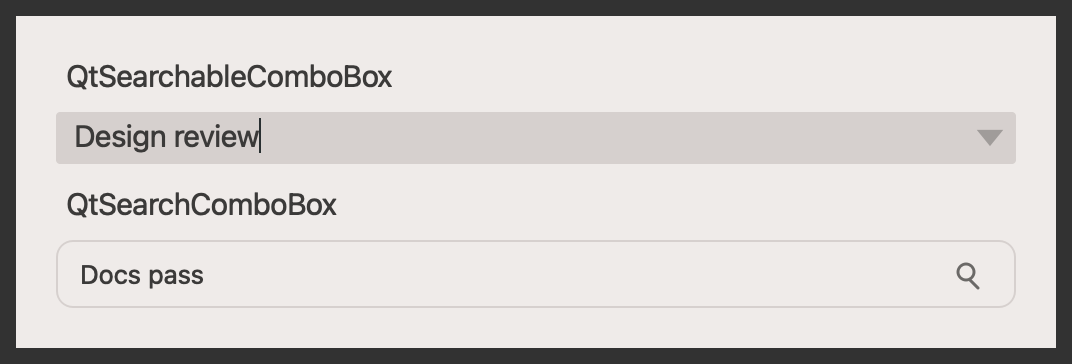
Example#
Source: examples/qt_combobox_search.py
"""Search combobox widgets."""

from qtpy.QtWidgets import QApplication, QLabel, QVBoxLayout, QWidget

from qtextra.config import THEMES
from qtextra.widgets.qt_combobox_search import QtSearchableComboBox, QtSearchComboBox

OPTIONS = [
    "Alpha project",
    "Beta release",
    "Critical bugfix",
    "Design review",
    "Docs pass",
    "Nightly build",
]

app = QApplication([])

widget = QWidget()
widget.setMinimumWidth(520)
THEMES.apply(widget)

layout = QVBoxLayout(widget)
layout.addWidget(QLabel("QtSearchableComboBox"))
searchable = QtSearchableComboBox(widget)
searchable.addItems(OPTIONS)
searchable.setCurrentText("Design review")
layout.addWidget(searchable)

layout.addWidget(QLabel("QtSearchComboBox"))
search = QtSearchComboBox(parent=widget)
search.addItems(OPTIONS)
search.set_current_text("Docs pass")
layout.addWidget(search)

layout.addStretch(1)
widget.show()

app.exec_()
Notes#
QtSearchComboBoxuses a custom popup panel with its own search field.QtSearchableComboBoxextendsQComboBoxwith completer-based filtering.