QtCountdownWidget#
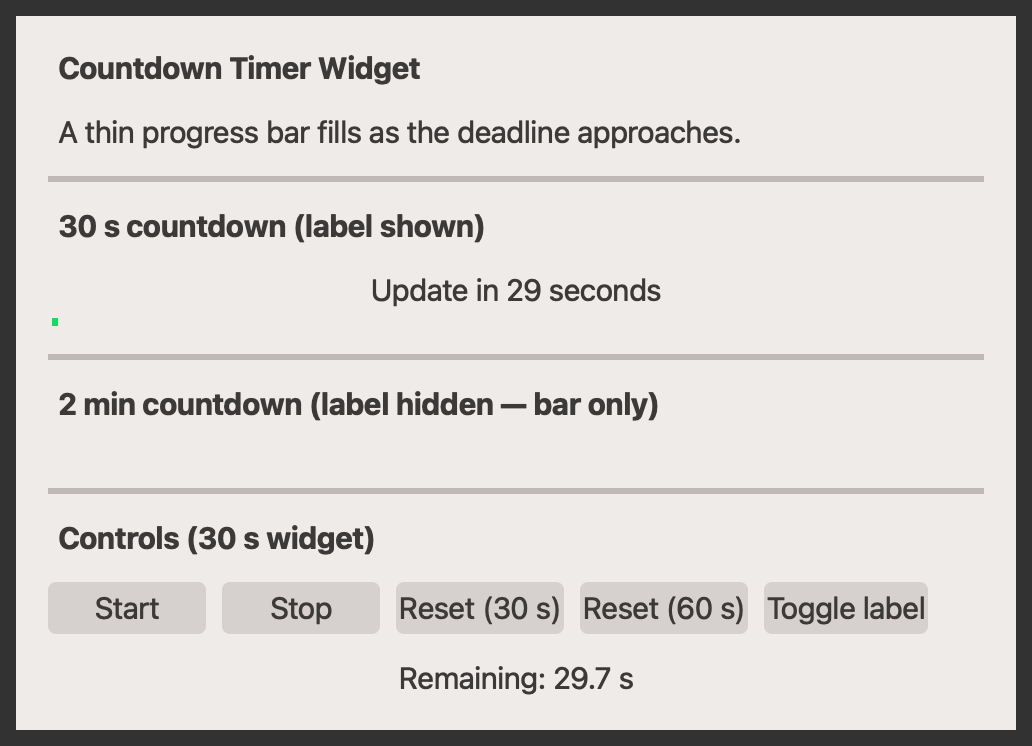
A compact widget that displays remaining time until an upcoming event — useful for notifying users about imminent updates, restarts, or scheduled changes.
Screenshot#
Example#
Source: examples/qt_countdown.py
"""QtCountdownWidget example."""

from qtpy.QtCore import Qt
from qtpy.QtWidgets import QApplication, QWidget

import qtextra.helpers as hp
from qtextra.config import THEMES
from qtextra.widgets.qt_countdown import QtCountdownWidget

app = QApplication([])

widget = QWidget()
widget.setWindowTitle("QtCountdownWidget Example")
widget.setMinimumWidth(500)
THEMES.apply(widget)

layout = hp.make_v_layout(parent=widget, spacing=12, margin=16)
widget.setLayout(layout)

layout.addWidget(hp.make_label(widget, "Countdown Timer Widget", bold=True))
layout.addWidget(hp.make_label(widget, "A thin progress bar fills as the deadline approaches."))
layout.addWidget(hp.make_h_line(widget))

# --- 30-second countdown with label visible ---
layout.addWidget(hp.make_label(widget, "30 s countdown (label shown)", bold=True))
cd_30 = QtCountdownWidget(duration_seconds=30, message="Update in", show_label=True, parent=widget)
layout.addWidget(cd_30)
cd_30.start()

layout.addWidget(hp.make_h_line(widget))

# --- 2-minute countdown, label hidden ---
layout.addWidget(hp.make_label(widget, "2 min countdown (label hidden — bar only)", bold=True))
cd_2m = QtCountdownWidget(duration_seconds=120, message="Restart in", show_label=False, parent=widget)
layout.addWidget(cd_2m)
cd_2m.start()

layout.addWidget(hp.make_h_line(widget))

# --- Controls for the 30-second widget ---
layout.addWidget(hp.make_label(widget, "Controls (30 s widget)", bold=True))

btn_row_layout = hp.make_h_layout(parent=None, spacing=8)

btn_start = hp.make_btn(widget, "Start")
btn_start.clicked.connect(cd_30.start)

btn_stop = hp.make_btn(widget, "Stop")
btn_stop.clicked.connect(cd_30.stop)

btn_reset_30 = hp.make_btn(widget, "Reset (30 s)")
btn_reset_30.clicked.connect(lambda: cd_30.reset(30))

btn_reset_60 = hp.make_btn(widget, "Reset (60 s)")
btn_reset_60.clicked.connect(lambda: cd_30.reset(60))

btn_toggle_label = hp.make_btn(widget, "Toggle label")
btn_toggle_label.clicked.connect(lambda: setattr(cd_30, "label_visible", not cd_30.label_visible))

for btn in (btn_start, btn_stop, btn_reset_30, btn_reset_60, btn_toggle_label):
    btn_row_layout.addWidget(btn)

btn_row_layout.addStretch(1)
layout.addLayout(btn_row_layout)

status_label = hp.make_label(widget, "", alignment=Qt.AlignmentFlag.AlignCenter)
layout.addWidget(status_label)
cd_30.evt_expired.connect(lambda: status_label.setText("Countdown expired!"))
cd_30.evt_tick.connect(lambda s: status_label.setText(f"Remaining: {s:.1f} s"))

layout.addStretch(1)

widget.show()
app.exec()
Notes#
- The progress bar fills from left to right as time elapses; it is empty at the start and full at expiry.
- The text label can be hidden independently of the bar so you can show a bar-only indicator in tight layouts.
tick_interval_mscontrols how often the display refreshes (default 50 ms); the decrement per tick is calculated automatically so the total duration is always respected regardless of the chosen interval.evt_expiredis emitted exactly once when the countdown reaches zero and the internal timer stops automatically.- Call
reset()(optionally with a new duration) to reuse the widget for subsequent events without re-creating it.
API#
Qt Class#
Signals#
evt_tick#
evt_expired#
Methods#
Widget that displays remaining time until an upcoming event.
Shows a label with a human-readable countdown and a thin progress bar that fills as the deadline approaches.
Signals
evt_expired : Signal Emitted when the countdown reaches zero. evt_tick : Signal(float) Emitted on each timer tick with the remaining seconds.
label_visible: bool
property
writable
#
Whether the text label is visible.
Uses not isHidden() so it reflects the explicit show/hide state
regardless of whether the parent widget has been shown yet.
message: str
property
writable
#
Prefix message shown before the remaining time.
remaining_seconds: float
property
#
Remaining time in seconds.
reset(duration_seconds: float | None = None) -> None
#
Reset the countdown, optionally with a new duration.
start() -> None
#
Start the countdown.
stop() -> None
#
Stop the countdown without resetting.