QtPushButton (variants)#
Theme-aware push buttons with activity and rich-text display helpers.
Screenshot#
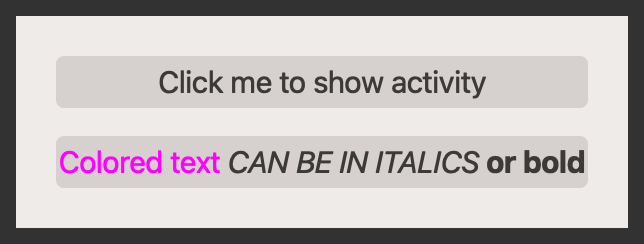
Example#
Source: examples/qt_button.py
"""QtActiveProgressBarButton."""

from qtpy.QtWidgets import QApplication, QVBoxLayout, QWidget

from qtextra.config import THEMES
from qtextra.widgets.qt_button import QtActivePushButton, QtRichTextButton

app = QApplication([])

widget = QWidget()
THEMES.apply(widget)

layout = QVBoxLayout()
widget.setLayout(layout)

active_btn = QtActivePushButton(widget)
active_btn.setText("Click me to show activity")
active_btn.click()
layout.addWidget(active_btn)

rich_btn = QtRichTextButton(widget)
rich_btn.setText("<span style='color:#ff00ff;'>Colored text</span> <i>CAN BE IN ITALICS</i> <b>or bold</b>")
layout.addWidget(rich_btn)
widget.show()

app.exec_()
Notes#
- Use
QtActivePushButtonwhen a click should immediately communicate background activity. - Use
QtRichTextButtonwhen button text needs inline emphasis or multiple styles.
API#
Qt Class#
Signals#
evt_right_click#
Methods#
Standard Qt button. Here to enable easier styling.
has_right_click: bool = False
class-attribute
instance-attribute
#
connect_to_right_click(func: ty.Callable) -> None
#
Connect function right right-click.
It is not possible to check whether a function is connected to a signal so its better to use this function to connect via this function which leaves behind a flag so the paint event will add rectangle to the edge so the user knows there is a right-click menu available.
setTextFormat(fm: Qt.TextFormat) -> None
#
SEt text format.
setWordWrap(state: bool) -> None
#
Set word wrap on the button.
Qt Class#
Methods#
Qt button with activity indicator built-in.
active: bool
property
writable
#
Update the state of the loading label.
Qt Class#
Methods#
Rich-text button.