QtIconButtons#
A family of icon buttons for toggles, state indicators, and common toolbar actions.
Screenshot#
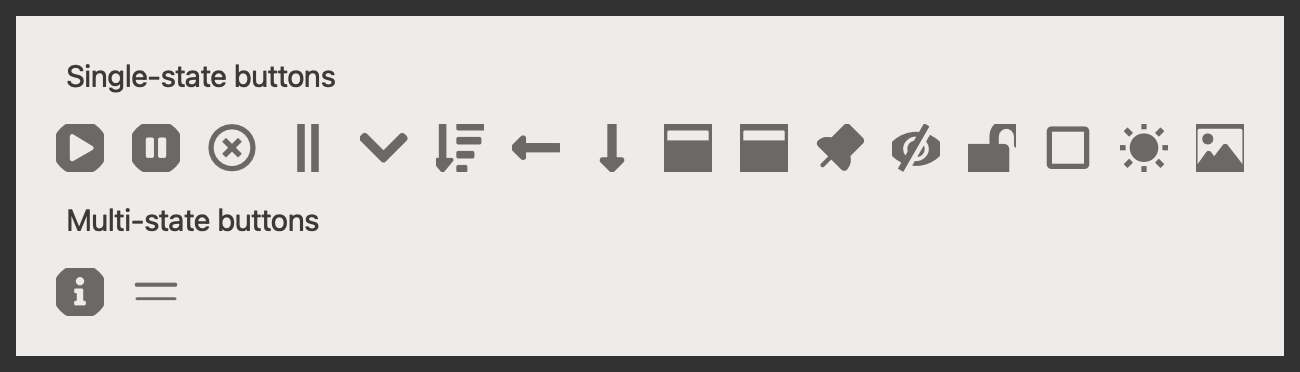
Example#
Source: examples/qt_button_icon.py
"""QtIconButtons."""

from qtpy.QtWidgets import QApplication, QHBoxLayout, QLabel, QVBoxLayout, QWidget

from qtextra.config import THEMES
from qtextra.widgets.qt_button_icon import (
    QtAndOrButton,
    QtAnimationPlayButton,
    QtBoolButton,
    QtExpandButton,
    QtFullscreenButton,
    QtHorizontalDirectionButton,
    QtImageButton,
    QtLockButton,
    QtMinimizeButton,
    QtPauseButton,
    QtPinButton,
    QtPriorityButton,
    QtSortButton,
    QtStateButton,
    QtThemeButton,
    QtToggleButton,
    QtVerticalDirectionButton,
    QtVisibleButton,
)

app = QApplication([])

widget = QWidget()
THEMES.apply(widget)

layout = QVBoxLayout()
widget.setLayout(layout)

# single-state buttons can only swap between two states
layout.addWidget(QLabel("Single-state buttons"))
row_layout = QHBoxLayout()
layout.addLayout(row_layout)
for klass in [
    QtAnimationPlayButton,
    QtPauseButton,
    QtBoolButton,
    QtAndOrButton,
    QtExpandButton,
    QtSortButton,
    QtHorizontalDirectionButton,
    QtVerticalDirectionButton,
    QtMinimizeButton,
    QtFullscreenButton,
    QtPinButton,
    QtVisibleButton,
    QtLockButton,
    QtToggleButton,
    QtThemeButton,
    QtImageButton,
]:
    # crate an instance of the class, auto_connect will ensure that the icon changes upon clicking
    btn = klass(widget, auto_connect=True)
    btn.clicked.connect(lambda *, btn=btn: print(f"{btn.__class__.__name__} clicked"))
    btn.setToolTip(btn.__class__.__name__)
    btn.set_qta_size_preset("large")
    row_layout.addWidget(btn)

# multi-state buttons can only swap between multiple states by selection from a list
layout.addWidget(QLabel("Multi-state buttons"))
row_layout = QHBoxLayout()
layout.addLayout(row_layout)
for klass in [QtStateButton, QtPriorityButton]:
    # crate an instance of the class, auto_connect will ensure that the icon changes upon clicking
    btn = klass(widget, auto_connect=True)
    btn.evt_changed.connect(lambda state, *, btn=btn: print(f"{btn.__class__.__name__} clicked {state}"))
    btn.setToolTip(btn.__class__.__name__)
    btn.set_qta_size_preset("large")
    row_layout.addWidget(btn)
row_layout.addStretch()

widget.show()
app.exec_()
Notes#
- Single-state variants swap between two related icons when toggled.
- Stateful variants such as
QtStateButtoncycle through multiple semantic states.
API#
Qt Class#
Signals#
evt_click#
evt_right_click#
Methods#
Image button.
connectToRightClick = connect_to_right_click
class-attribute
instance-attribute
#
count: int = 0
class-attribute
instance-attribute
#
count_enabled: bool = False
class-attribute
instance-attribute
#
has_right_click: bool = False
class-attribute
instance-attribute
#
menu_enabled: bool = False
class-attribute
instance-attribute
#
onClick = on_click
class-attribute
instance-attribute
#
onRightClick = on_right_click
class-attribute
instance-attribute
#
setCount = set_count
class-attribute
instance-attribute
#
setToggleQta = set_toggle_qta
class-attribute
instance-attribute
#
setTransparent = set_transparent
class-attribute
instance-attribute
#
connect_to_right_click(func: ty.Callable) -> None
#
Connect function right right-click.
It is not possible to check whether a function is connected to a signal so its better to use this function to connect via this function which leaves behind a flag so the paint event will add rectangle to the edge so the user knows there is a right-click menu available.
on_click() -> None
#
Click event.
on_right_click() -> None
#
Right click event.
set_count(count: int, enabled: bool = True) -> None
#
Enable count indicator.
set_toggle_qta(name: str, checked_name: str, connect: bool = True, **kwargs: ty.Any) -> None
#
Set changeable icon.
set_transparent(transparent: bool) -> None
#
Set transparency.
Qt Class#
Signals#
evt_toggled#
Methods#
Toggle button.
ICON_OFF: str = ''
class-attribute
instance-attribute
#
ICON_ON: str = ''
class-attribute
instance-attribute
#
autoConnect = auto_connect
class-attribute
instance-attribute
#
setState = set_state
class-attribute
instance-attribute
#
state: bool
property
writable
#
Get state.
toggleState = toggle_state
class-attribute
instance-attribute
#
auto_connect() -> None
#
Automatically connect.
set_state(state: bool, trigger: bool = True) -> None
#
Set state.
toggle_state() -> None
#
Toggle state.
Qt Class#
Methods#
State button.
DEFAULT_STATE = 'info'
class-attribute
instance-attribute
#
STATE_TO_ICON: dict[str, str] = {'success': 'success', 'debug': 'debug', 'info': 'info', 'warning': 'warning', 'error': 'error'}
class-attribute
#
STATE_TO_OPTION: dict[str, str] = {'success': 'Success', 'debug': 'Debug', 'info': 'Info', 'warning': 'Warning', 'error': 'Error'}
class-attribute
#
Qt Class#
Methods#
Priority button.
DEFAULT_STATE = 'normal'
class-attribute
instance-attribute
#
STATE_TO_ICON: dict[str, str] = {'low': 'priority_low', 'normal': 'priority_normal', 'high': 'priority_high'}
class-attribute
#
STATE_TO_OPTION: dict[str, str] = {'low': 'Low', 'normal': 'Normal', 'high': 'High'}
class-attribute
#
priority: str
property
writable
#
Get playing state.