QtCheckCollapsible#
A superqt.QCollapsible variant with checkbox, action button, and warning state in the header.
Screenshot#
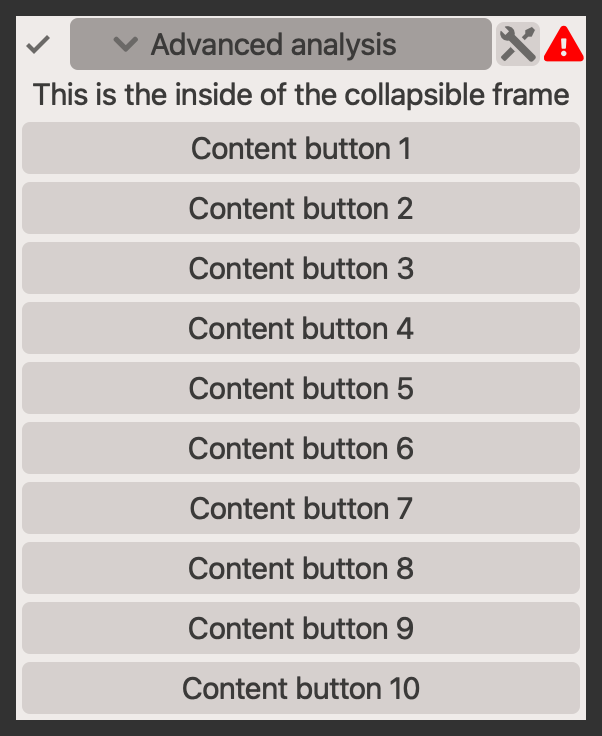
Example#
Source: examples/qt_collapsible.py
"""QtCheckCollapsible."""

from qtpy.QtWidgets import QApplication, QLabel, QPushButton

from qtextra.config import THEMES
from qtextra.widgets.qt_collapsible import QtCheckCollapsible

app = QApplication([])
widget = QtCheckCollapsible("Advanced analysis", icon="settings", warning_icon=("warning", {"color": "red"}))
THEMES.apply(widget)

# you can display warnings in the collapsible to highlight if an option needs attention
widget.warning_label.setToolTip("This is a warning about something hidden within the collapsible")
# you can also use the additional action button to perform an action
widget.action_btn.clicked.connect(lambda: print("Icon button clicked"))
# add widgets to the collapsible
widget.addRow(QLabel("This is the inside of the collapsible frame"))
for i in range(10):
    widget.addRow(QPushButton(f"Content button {i + 1}"))
widget.expand(animate=False)
widget.show()

app.exec_()
Notes#
- The content area uses a
QFormLayout, soaddRowworks naturally for form-style panels. - Header controls can be shown or hidden independently depending on the workflow.
API#
Qt Class#
Methods#
A collapsible widget to hide and unhide child widgets.
Based on https://stackoverflow.com/a/68141638
is_checked: bool
property
#
Determine whether widget is checked.
setCheckboxVisible = set_checkbox_visible
class-attribute
instance-attribute
#
setIconVisible = set_icon_visible
class-attribute
instance-attribute
#
setWarningVisible = set_warning_visible
class-attribute
instance-attribute
#
addLayout(layout: QLayout)
#
Add layout to the central content widget's layout.
addRow(label: str | QWidget | QLayout, widget: QWidget | None = None)
#
Add layout to the central content widget's layout.
set_checkbox_visible(state: bool) -> None
#
Show or hide the checkbox.
set_icon_visible(state: bool) -> None
#
Show or hide the checkbox.
set_warning_visible(state: bool) -> None
#
Show or hide the checkbox.